Release Blog 2026.2 - The Summer Release
Axual 2026.2, the Summer LTS release, brings continuous message fetching and CEL-based queries to Topic Browse, Externalised Groups for managing membership through your Identity Provider, the move to Apicurio v3, improved Audit Events, KSML 1.3, and new MCP Server capabilities.

On this page
Release Blog 2026.2 : The Summer Release (LTS)
Building on the audit, OAuth, and usability improvements introduced in 2026.1. Axual 2026.2 is here as our Summer LTS release. We're especially excited about two updates in this one: Topic Browse now supports continuous message fetching, CEL-based queries, and partition/offset navigation, making it easier to find and debug the messages that matter.
Externalised Groups lets our users use their existing Identity Provider as the single source of truth for group membership saving a lot of duplicate admin work.
Of course, that's not the whole story. This release also includes the move to Apicurio v3 as the default schema registry, further improvements to Audit Events, KSML 1.3, new MCP Server capabilities, and a range of other enhancements covered below.
This release can be installed with:
- Streaming chart 2.0.0
- Governance chart 1.5.0
What's Included in the 2026.2 Release
- Topic Browse improvements
- Externalised Groups
- Upgrade to Apicurio v3
- Audit events improved
- KSML 1.3
- MCP Server
- (General)Other noteworthy improvements
- Documentation updates
Topic Browse improvements
Why we're excited
Topic Browse lets you see whether messages have ended up on the platform correctly. Users can now filter on partitions and on the particular offsets of a specific partition, query messages using Common Expression Language (CEL) to make complex queries, automatically fetch and display new messages as they are being produced, and see messages in a raw format for an easier debugging process.
What we did
- Added filtering by partition.
- Introduced filtering by specific offsets within a selected partition.
- Enabled message queries with Common Expression Language (CEL), including queries such as value.name == "Alice".
- Added open-ended search filters, allowing Start fetching to continuously retrieve new messages as they are produced.
- Included the option to view messages in raw format.
- Added more information for topic masking field configuration.
Note: Partition offset search is not compatible with time range search.
How it improves our users experience
Use the Environment, Cluster, Message Range, and Time Range filters, or narrow down the search using a simple query or a complex CEL expression. Click a row to expand the view and open a viewer that shows the full message details, which you can expand or collapse individually. Each row shows the technical message details: Partition (the topic's partition the message is stored on), Offset (the sequence number of the message on the partition), and timestamp (the producer timestamp) which can be handy for debugging purposes. To load more results click Load More, and to continuously fetch the latest messages click Start fetching.
See continuous browse in action: watch new messages stream in automatically for open-ended queries like relative time or unbounded partition offsets: Here
Learn how to filter messages by cluster and offset: Here
Externalised Groups
Why we're excited about it:
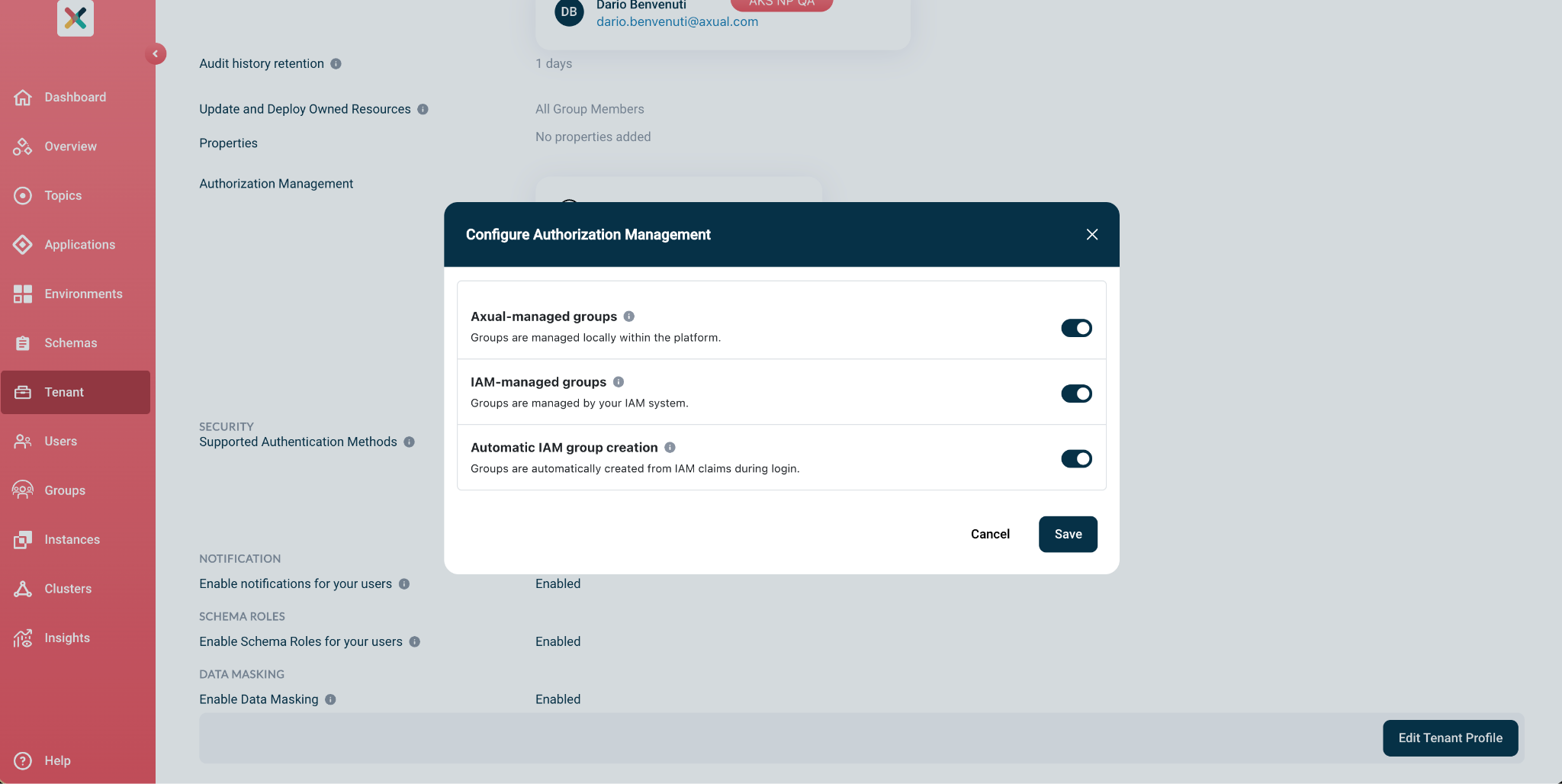
Enterprise customers already manage who's on which team in their own Identity Provider, and until now they had to recreate all of that by hand inside Axual — a real procurement blocker and a constant source of duplicate admin work. Externalized Groups lets the existing IdP become the single source of truth for group membership, so identity lives in one place and Axual reads from it.
What we did
- We added IAM-managed groups alongside Axual-managed ones, switchable from the Tenant page via the Group Management settings, Axual Group Management, IAM Group Management, and an Automatic IAM Group Creation toggle, with at least one mode always enabled.
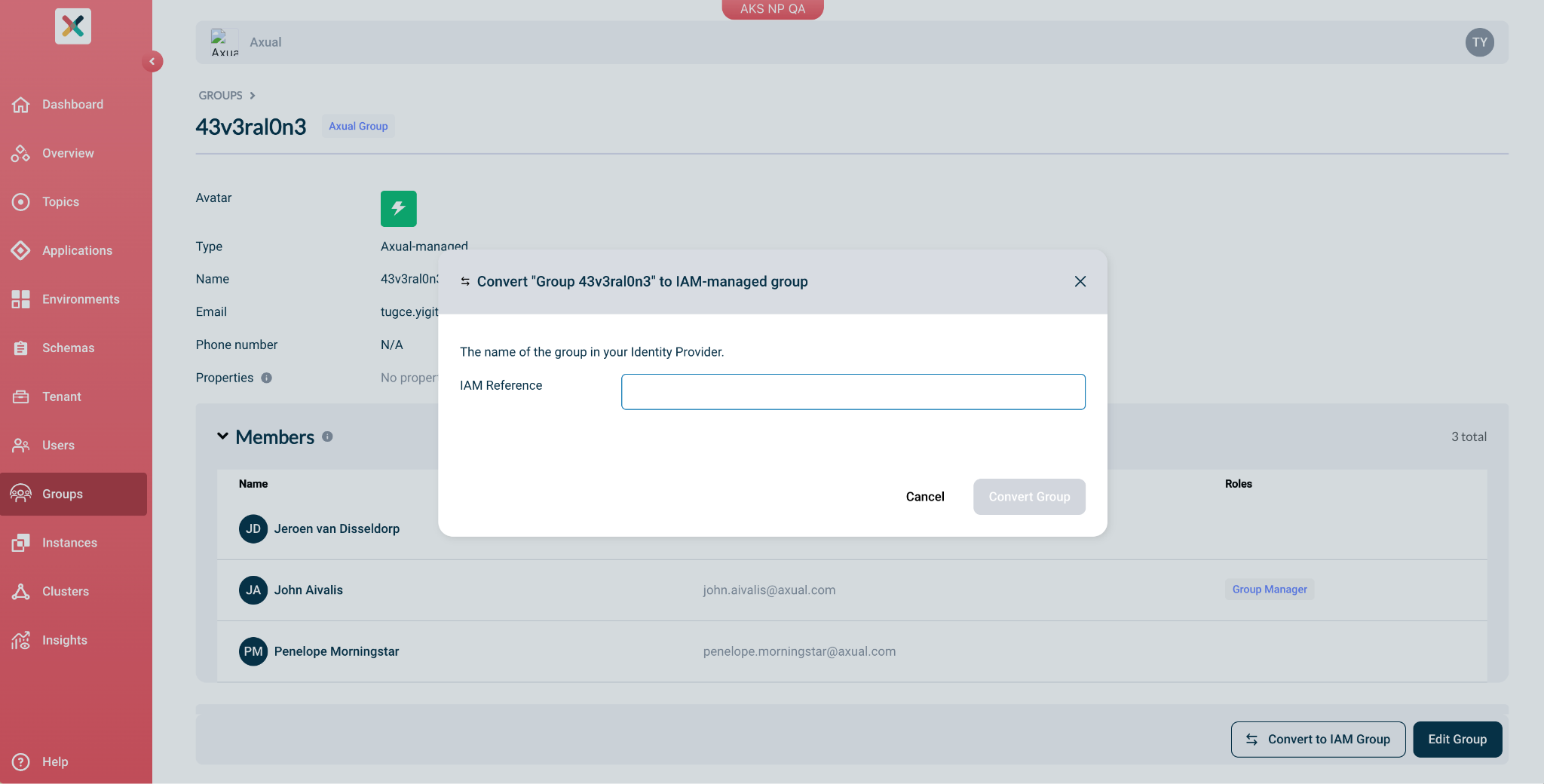
- A Tenant Admin can convert a group from Axual-managed to IAM-managed (and back), entering an IAM Reference that matches the group in the IdP (e.g. an Azure AD group Object ID, unique per tenant). For IAM groups, membership is resolved from the groups claim in the user's JWT on every request and validated there, rather than stored in Self-Service; automatic creation will spin up an IAM group from an unknown claim at login and assign the triggering user as Group Manager.
- We also built Group Manager and Resource Manager authorization for IAM groups, updated the Add Group page and the IAM group detail view and edit pages, and added observability to track which users authenticate via IAM-managed groups (uses_iam).
How it improves our users experience
Users get the right access automatically on login with no waiting for manual group assignment, and when they leave a team in the IdP that access drops at their next login. There's no dual maintenance and no sync jobs, migration is gradual group by group in hybrid mode, fully reversible and Group Managers can still layer fine-grained Resource Manager permissions on top of IAM membership.
Check out the documentation and find more feature related updates: Here
Upgrade to Apicurio v3
Axual Platform now comes with Apicurio Registry v3 as its default schema registry, while v2 becomes officially deprecated. Apicurio v3 is a more modern schema registry that closely follows worldwide accepted standards for message and schema (de)serialization. As part of this release, Axual provides upgrade timelines and support (Helm charts, documentation, service desk guidance). This gives teams a clear migration path while Apicurio v2 is being phased out.
What we did
- Added support for running Apicurio v3 alongside Apicurio v2 during the migration.
- Provided an upgrade path to export schemas from v2 and import them into v3.
- Kept existing applications compatible, so teams can upgrade the registry first and update client libraries later.
- Added support for the Apicurio v3 architecture, including separate Kafka topics for journal, snapshots, and events.
- Documented the full upgrade process, including preparation, deployment, validation, ingress switch, rollback, and troubleshooting.
How it improves our users experience
Teams can migrate to Apicurio v3 in a controlled way, without a disruptive big-bang upgrade. Existing applications can continue using the v2 API while the registry server runs on v3, and the side-by-side setup gives platform teams time to validate the migration before retiring v2. Clear documentation further reduces upgrade risk and helps teams plan the migration with confidence.
Important to know
- Apicurio v2 is still supported in the 2026.2 release.
- Apicurio v2 will be removed in 2026.3.
- LTS users can continue using v2 until the next LTS release, 2027.2.
- Teams should start planning their Apicurio v3 upgrade now.
Audit Events: Now Easier to Externalize
Alongside externalizing audit events, the Audit History feature itself now gives Tenant Admins more control over what's kept and what's findable, configurable retention windows and the ability to search for resources that have been deleted or recreated.
What we did
- Added configurable audit retention: Operators set a global maximum retention time in the Platform Manager's values.yaml (365 days by default), and Tenant Admins can then set their own retention period for their tenant on the Tenant Settings page, as long as it stays within that limit.
- Made it possible to set retention to 0, so audit events are kept indefinitely with no automatic deletion.
- Improved the existing ability to search the Audit History for deleted or recreated resources, by name or email address, even after the resource itself no longer exists.
How it improves our users experience:
Tenant Admins can now match retention to their own compliance or investigation needs instead of relying on one fixed period for everyone. The Audit History view displays the current retention period, so it's always clear how far back the history goes, and a tooltip on the Tenant Settings page shows the maximum allowed by the Platform Manager. Being able to search for deleted or recreated resources also makes it easier to trace what happened to something that no longer exists in the system, without digging through raw logs.
- Allow configuration of retention time audit events in the Axual db: https://docs.axual.io/axual/2026.2/self-service/audit-history.html#configure-audit-retention-time
- Write audit events to an external file :https://docs.axual.io/axual/2026.2/components/governance/platform-manager/index.html#externalize-audit-event-logs
KSML 1.3
In this release, KSML 1.3 includes improvements to schema handling, testing, security, and runtime stability. Most of these changes are under the hood, but they make KSML more reliable for teams building and operating streaming pipelines.
What we did
- Added a KSML pipeline testing framework.
- Added schema evolution compatibility tests for Avro, JSON Schema, and Protobuf.
- Improved Apicurio support, including authentication, nested schema handling, and schema inference from the registry.
- Fixed several Avro-related issues, including crashes on schemas with composite default values and silent integer overflow in schema evolution.
- Added an extra safeguard against path traversal in pipeline definitions.
- Added configurable runtimeClassName support for pods in the Helm chart.
- Removed SOAP notation support.
- Upgraded Kafka Clients, Confluent serdes, the Red Hat UBI base image, and other dependencies.
- Improved code quality, release tooling, and JVM warning handling.
How it improves our users experience:
KSML pipelines become easier to test, safer to run, and more reliable when working with schemas. Better Apicurio integration helps teams use schemas more consistently, while the testing framework gives developers more confidence before deploying changes. The security and dependency updates also improve the operational foundation without requiring users to change how they work.
Check out: Release notes for KSML 1.3.0:
Check out: documentation.
MCP Server updates
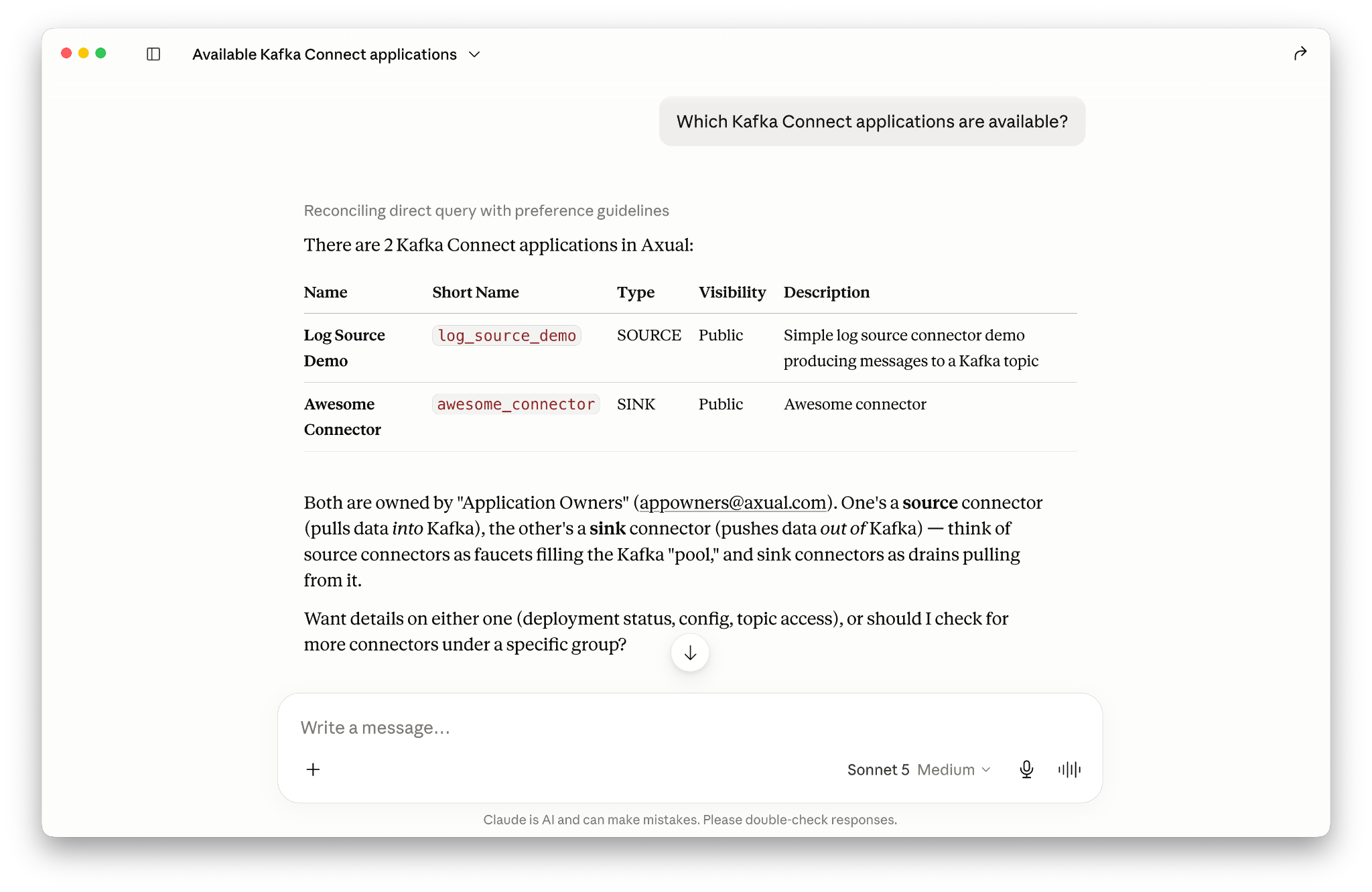
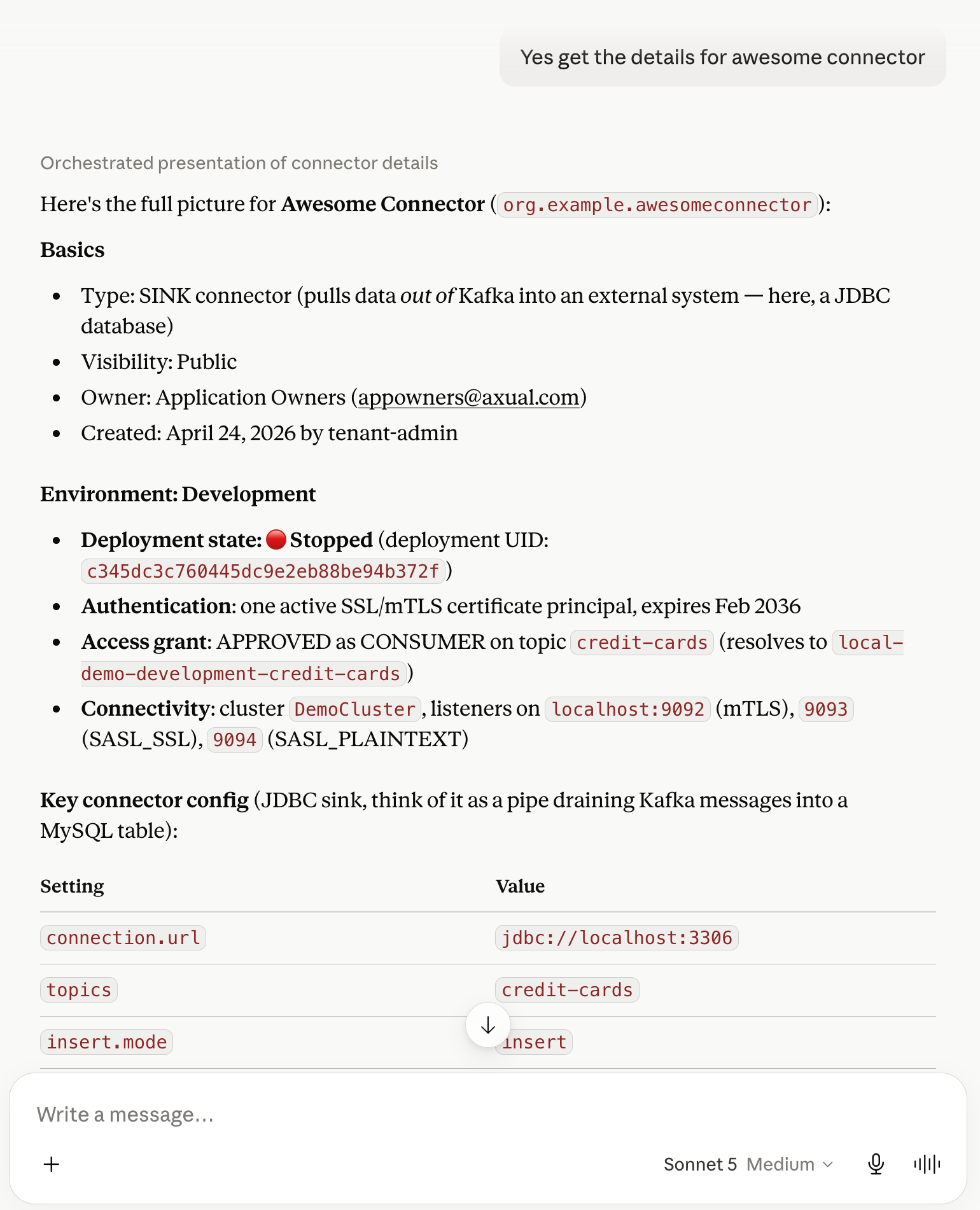
The MCP server for Axual gets some exciting updates around managing applications. In addition to managing topics which was already possible in previous releases, now you can create Kafka applications, request access to topics and approve the access requests. This release adds 7 new MCP tools to the server.
Documentation updates
In this release, the documentation features a complete navigation restructure based on user personas and separation of concerns. While much of the underlying content remains the same, this reorganization makes finding specific guides much more intuitive for self-service users, developers, and operators.
What we did
- Restructured the navigation into persona-specific guides: Self-Service, Application, and Operations.
- Added a dedicated Overview section and landing page to introduce Axual and the platform architecture.
- Consolidated developer tooling, client libraries, REST Proxy, CI/CD, Terraform, and MCP into the Application Guide.
Other noteworthy improvements
- Better connector handling
- Improved available actions based on Connector and Task status
- More consistent use of default values and user-supplied connector configuration
- Tenant Admin Insights improvements
- Created a detailed view of sortable insights per existing Insight type
- Terraform improvements
- Allow replacing a Connector certificate/private-key through TF
- KSML Deployment status:
- Application Card now also includes information around restart counts as an enhancement to status information
- Many UX/UI improvements
Contact us to learn how Axual supports enterprise Kafka environments with control and reliability. Explore the full release notes, check out the documentation, or get in touch with our team to see how these improvements can support your environment.

Answers to your questions about Axual’s All-in-one Kafka Platform
Are you curious about our All-in-one Kafka platform? Dive into our FAQs
for all the details you need, and find the answers to your burning questions.


Related blogs
Axual’s Autumn Release 2026.3 is here. You can now run multiple Kafka Connect clusters per instance for better isolation and no more noisy neighbors, and create Flink SQL applications to run stream processing jobs directly on the platform. This release also brings self-service service accounts, Strimzi v1 support in the Distributor, Terraform and MCP updates, and more.
Vulnerability reports are growing faster than security teams can process them. This article explores how AI can support vulnerability triage, why fixes take time to reach production and what the Trivy compromise taught us about software supply chain security.
.png)

Learn how to configure secure Kafka authentication in Strimzi for multi-tenant environments. This technical guide covers mTLS, certificate-chain principals, tenant-specific listeners, custom principal builders, OAuth bearer authentication, and the risks of relying on Strimzi internals.