Release Blog 2026.3: The Autumn Release
Axual’s Autumn Release 2026.3 is here. You can now run multiple Kafka Connect clusters per instance for better isolation and no more noisy neighbors, and create Flink SQL applications to run stream processing jobs directly on the platform. This release also brings self-service service accounts, Strimzi v1 support in the Distributor, Terraform and MCP updates, and more.
On this page
What's included in the 2026.3 Release
- Kafka Connect reimagined
- Flink SQL (MVP)
- Towards a uniform lifecycle for all Managed Applications
- Self-service Service Accounts
- Tenant Admin Insights
- Distributor
- KSML Provisioner is now Runtime Provisioner
- Terraform
- MCP
- Other changes and fixes
Building on the Topic Browse, Externalised Groups and Apicurio v3 updates introduced in 2026.2, Axual 2026.3 is here as our Autumn Release. We're particularly excited about Kafka Connect reimagined. You can now run multiple Kafka Connect clusters per instance, which means no more noisy neighbors and better isolation. This release also introduces Flink SQL as an MVP. You can now create a Flink SQL application to run stream processing jobs directly on the platform. You write the SQL, and Axual runs it as a managed job on a Flink cluster your tenant has registered.
Of course, that's not the whole story. This release also includes a more uniform lifecycle for all Managed Applications, Self-service Service Accounts, new Tenant Admin Insights, Strimzi v1 support and stall detection in the Distributor, the KSML Provisioner renamed to Runtime Provisioner, Terraform and MCP updates, and a range of other changes and fixes covered below.
This release can be installed with:
Streaming charts: 3.0.0
Governance charts: 1.6.0
Kafka Connect reimagined
Why we're excited
You can now run multiple Kafka Connect clusters per instance. That means no more noisy neighbors and better isolation.
What we did
Multiple Kafka Connect clusters
Each instance can now have multiple Kafka Connect clusters. Access and deployment rights are set per Kafka Connect cluster.
Authentication
Kafka Connect applications now support SASL. Each Kafka Connect cluster uses one authentication mechanism.
Plugins
Each Kafka Connect cluster has its own plugin listing, and supports multiple versions of a plugin. Plugins and plugin configs are detected automatically on a periodic basis, and detection can also be triggered manually.
Logging and secrets
The logging experience is improved, similar to KSML. Connector secrets are stored in Vault.
Getting started
A new Helm chart makes it easy to get started, and Kafka Connect is fully supported by Terraform. See the operator manual for details: [Operator manual link]
What it does for our users
Running multiple Kafka Connect clusters per instance gives better isolation, with no more noisy neighbors. Access and deployment rights can be managed per cluster, each cluster has its own plugin listing, and the logging experience is similar to KSML. With targeted deployment, a connector application can point to a specific cluster.
Important to know
Axual Connect is now deprecated. It is supported until 2027.2 (LTS) and dropped after that.
Flink SQL (MVP)
- Flink cluster registration
- Managed Flink SQL applications
**This Flink feature is an MVP. We encourage you to try it now; it will be ready for production use in a later release.
Why we're excited
You can now create a Flink SQL application to run stream processing jobs directly on the platform. You write the SQL, and Axual runs it as a managed job on a Flink cluster your tenant has registered.
What we did
Flink cluster registrationTenant administrators can now register a Flink cluster against an instance, so applications in that instance have a runtime to deploy Flink SQL jobs to. Registering a cluster takes its URL, workspace and namespace, plus an API token to authenticate against it. Once registered, the cluster shows up as a deployment target when configuring a Flink SQL application. Administrators can view or edit its connection details from the instance page at any time.
Managed Flink SQL applicationsYou write a SQL script with table definitions for your Kafka sources and sinks, followed by the transformation logic. You can validate the SQL and select a deployment size, and Axual runs it as a managed job on a Flink cluster your tenant has registered.
Writing table definitions by hand is optional. Click Auto-generate SQL tables and Axual produces the CREATE TEMPORARY TABLE statements from your connected topics. They are shown read-only alongside the transformation logic you write. You can delete the generated tables at any time to switch back to writing them manually.
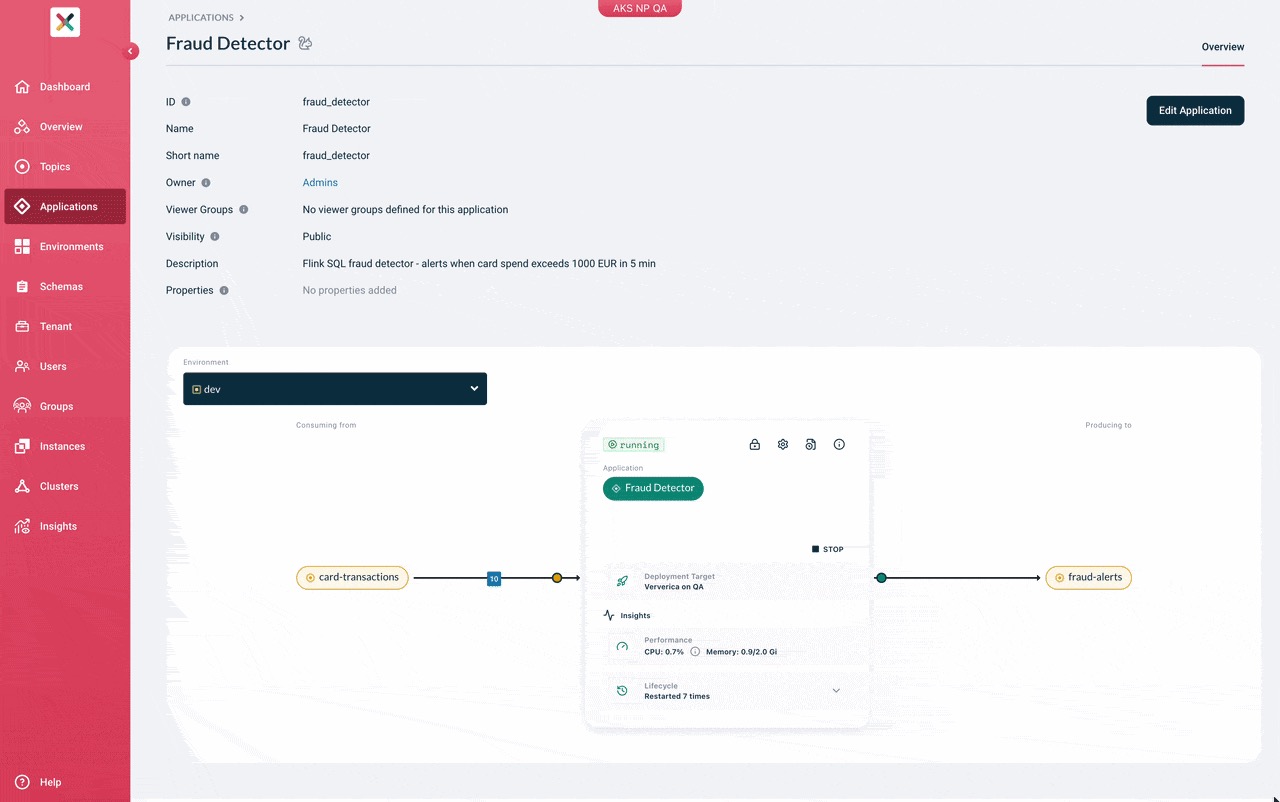
Flink SQL applications show their live status and CPU and memory usage on the application card, like KSML applications. From the same card you can start, stop, resume or reset the job, and view the JobManager log for the current or most recent run.
What it does for our users
Users can input, validate and deploy Flink SQL from the platform. Table definitions can be generated from connected topics instead of written by hand. Monitoring and lifecycle actions for the job are available from the application card, like the other application types. Read docs.
Towards a uniform lifecycle for all Managed Applications
Why we're excited
With Flink SQL joining Connectors and KSML as a managed application type, lifecycle management is becoming more uniform across all three.
What we did
Lifecycle management is now more uniform for Connectors, KSML and the newly introduced Flink SQL. Flink SQL applications show their live status and CPU and memory usage on the application card, like the other application types.
What it does for our users
The statuses guide you to resume an application from the latest state or reset and start the application with a fresh state. This already works for Flink and will be extended to Connectors and KSML in coming releases.
Self-service Service Accounts
Why we're excited
You can now create service accounts for your automation. Terraform runs, CI jobs and scripts can use one instead of a personal login.
What we did
Service accounts
A service account is a non-human identity that belongs to your tenant. It has its own client ID and client secret, gets a token with the OAuth2 Client Credentials grant, and calls the Axual API with it.
Permissions
A service account uses the same permission model as a user. You assign it roles and add it to groups, and it gets the access those roles and groups give.
Managing service accounts
Creating, editing, rotating and deleting a service account is a tenant administrator action. Each of those actions appears in the audit trail under the service account's client ID. The client secret is shown once, at creation and at rotation, and we do not store it. Rotation replaces the previous secret immediately. Deleting the service account removes its credential, and tokens already issued expire within five minutes or as configured by your administrator.
Workload identity federation with Microsoft Entra
Service accounts also support workload identity federation with Microsoft Entra. Instead of a client secret, the service account trusts a token issued by your Entra tenant. You give Axual the Object ID (OID) of the app registration or managed identity that runs the workload, and the workload authenticates with the token Entra already gives it. No secret is created and stored on our side. You rotate or revoke the identity in Entra.
Tenant Admin Insights
Why we're excited
Tenant Admin Insights now shows Application Principals that are being reused by different applications, and all tables can be downloaded as CSV.
What we did
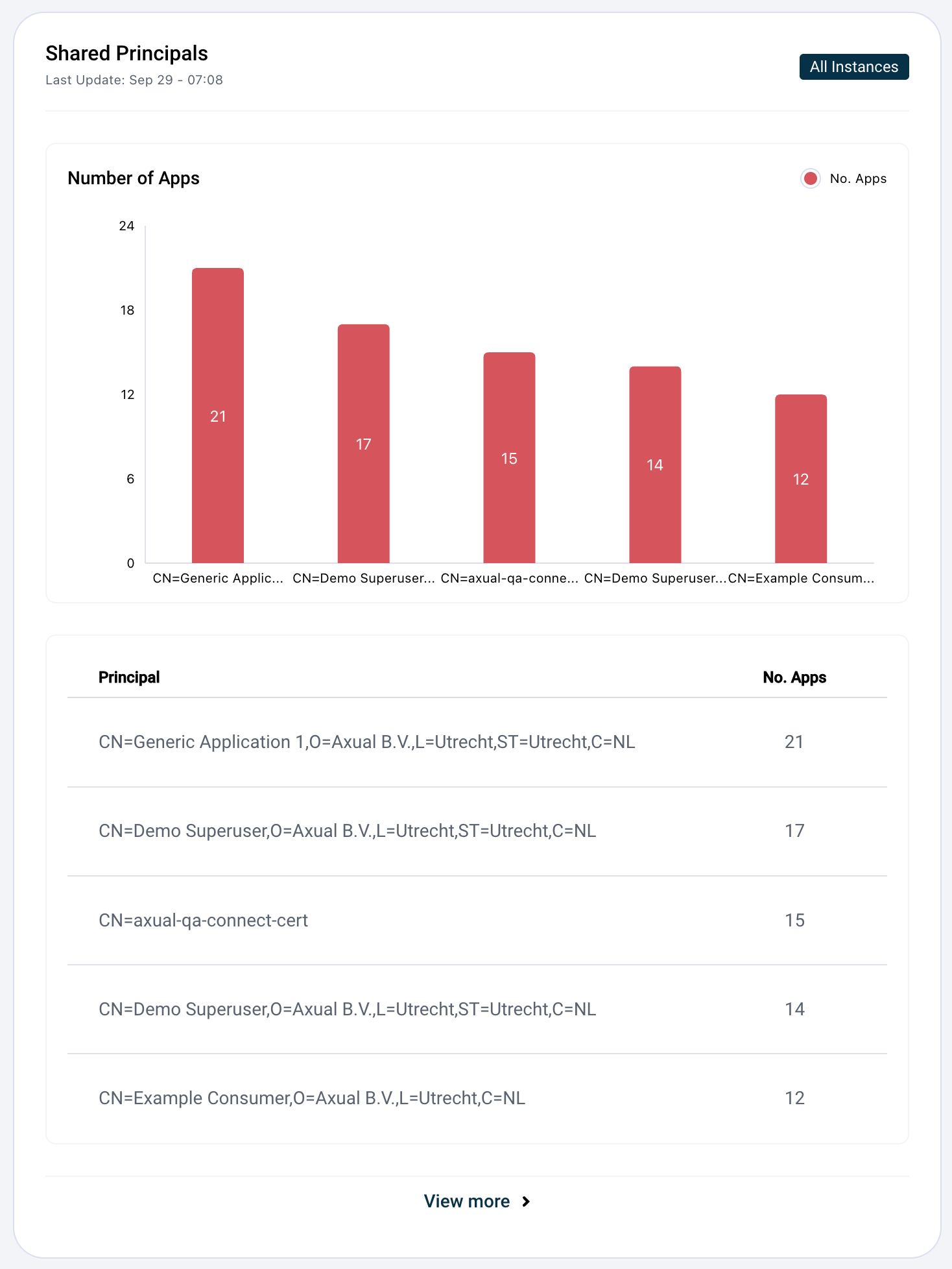
Application Principals/shared principals
A new insight shows Application Principals that are being reused by different applications. For security reasons, it's advised to have a unique certificate for each application in the production environment.
CSV download
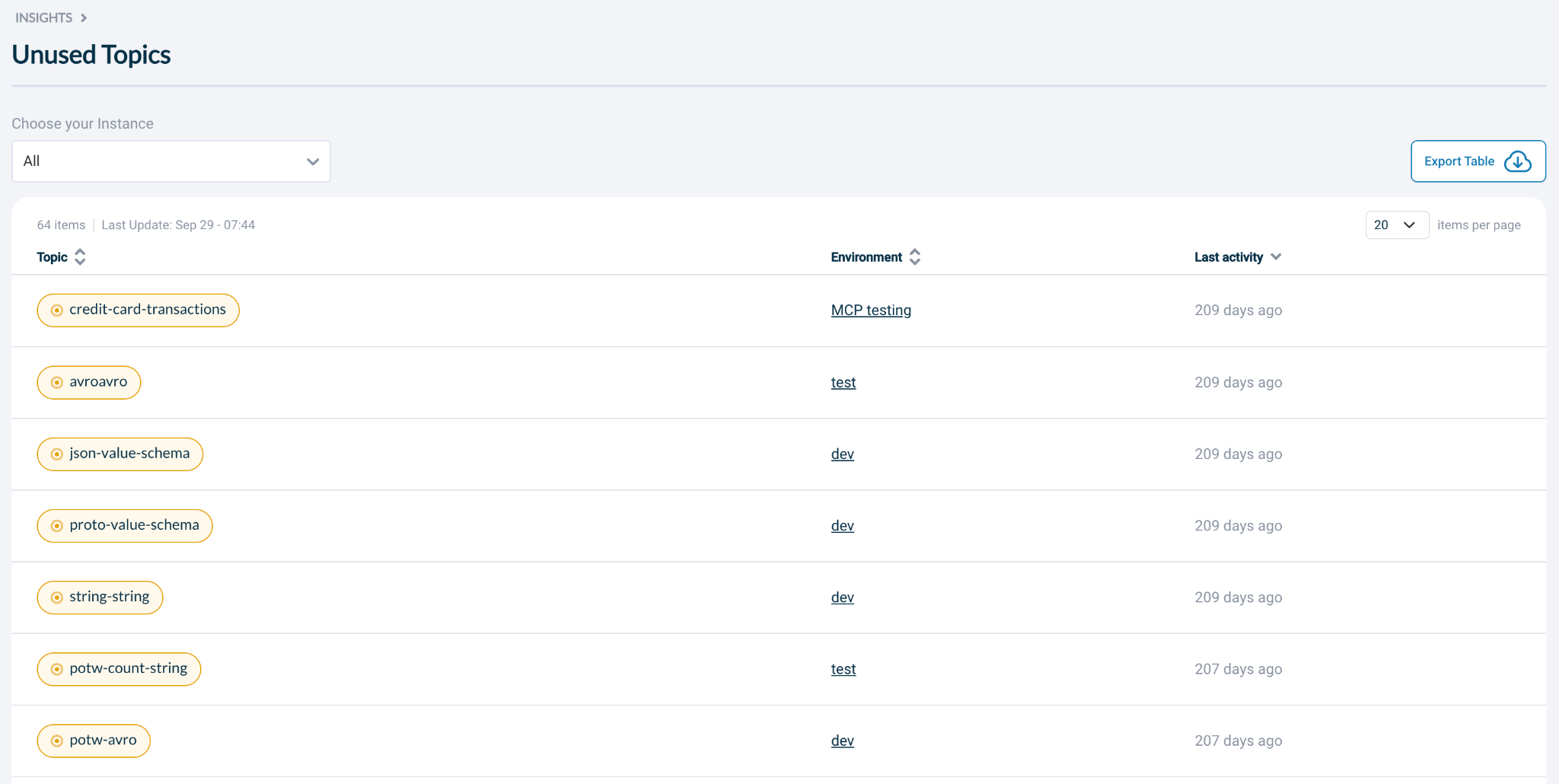
All tables can now be downloaded as CSV for external data analysis.
What it does for our users
Tenant admins can see which Application Principals are being reused by different applications. They can also download all tables as CSV for external data analysis. Read docs.
Distributor
Why we're excited
The Distributor now supports Strimzi 1.0.0 and 1.0.1 (Kafka 4.2.0) and Strimzi 1.1.0 (Kafka 4.3.0). The message distributor now also tells you when a task is stuck.
What we did
Strimzi v1 support
Strimzi 1.0 only serves the kafka.strimzi.io/v1 API and removes v1beta2, so the Helm chart now picks the API version for you. It reads strimzi.version and sends v1 manifests for Strimzi 1.0.0 and newer, and v1beta2 for older versions. Existing installations on Strimzi 0.40 to 0.51 keep working with no change.
You can also move to v1 before you upgrade the Strimzi operator. Strimzi 0.49 to 0.51 serve both APIs, so setting strimzi.apiVersion to v1 makes the chart send v1 manifests while the operator stays on its current version. The chart refuses combinations that cannot work, such as v1 on a Strimzi version older than 0.49.
Upgrading the Strimzi operator to 1.0 is a breaking change on the Strimzi side. Convert your existing custom resources to v1 with the Strimzi upgrade guide first, and do not delete and reinstall them. Distributor data, meaning topics and offsets, is not affected.
Stall detection
This release fixes a silent freeze: a message or offset distributor task could stop copying while it still showed as RUNNING, with no error. Now each message distributor task watches its own progress. If it has work waiting and makes no progress for five minutes (that is a configuration option), it marks itself as stalled in a metric and writes a log line. A new DistributorTaskStalled alert fires on that metric. Detection only reports. It never fails or restarts the task, so you decide what to do next. It is on by default, and you tune it with stall.detection.threshold.ms and stall.detection.check.interval.ms.
Better dashboards
The Message Distributor dashboard has new panels built on this data. It shows stall status per task, time without progress against the stall threshold, copy rate next to the rate messages arrive, lag per partition and topic partitioning. Health panels such as Running Tasks, Failed Tasks and exception counts now show 0 or OK when nothing has happened yet, instead of an unclear "No data". Every failure that stops progress is now counted per partition, including failures of a whole batch, so the exceptions panel shows everything.
What it does for our users
Existing installations on Strimzi 0.40 to 0.51 keep working with no change, and the Helm chart picks the API version for you. The message distributor now tells you when a task is stuck. Detection only reports, so you decide what to do next.
KSML Provisioner is now Runtime Provisioner
Why we're excited
The KSML Provisioner has been renamed to Runtime Provisioner. It now also works with Kafka Connect, so KSML is no longer the only runtime it serves.
What we did
The rename
The KSML Provisioner has been renamed to Runtime Provisioner. It is the service that connects Platform Manager to your Kubernetes cluster. For KSML, it deploys, starts, stops and removes applications as pods, reports their status, restarts as well as CPU and memory usage, and streams their logs. It now also works with Kafka Connect, so KSML is no longer the only runtime it serves.
The rename is a breaking change for monitoring. The alert name, the labels and the OpenTelemetry service name change, so dashboards and alert routes that match the old name stop matching. Read "How to Upgrade the KSML Provisioner to Runtime Provisioner 0.8.0" in the Axual documentation before you upgrade.
Kafka Connect logs
Runtime Provisioner can now read Kafka Connect logs. A Connect cluster writes its logs across many worker pods. The provisioner merges them into one time-ordered list, where every line shows the worker it came from and its timestamp. You get the recent history first, and then the log keeps following as new lines arrive. You can filter by connector name or by minimum log level, and stack traces stay with the line they belong to. If a worker cannot be read, you still get the logs of the others. You can also download the current log file of every worker combined in a single plain text file.
The number of lines you ask for is a best effort. Filtering happens after the logs are read, so the provisioner cannot know in advance how many lines will match. It reads a wider window of raw lines, filters them and returns up to the number you asked for. If the connector or level you filter on is rare, you get fewer lines.
What it does for our users
Kafka Connect logs from many worker pods are merged into one time-ordered list, where every line shows the worker it came from and its timestamp. You can filter by connector name or by minimum log level, and if a worker cannot be read, you still get the logs of the others.
Terraform
***The Terraform provider updates below will be released next week.
Why we're excited
The Terraform provider now supports Flink SQL, service account login and Kafka Connect clusters.
What we did
Flink SQL support
A new axual_flink_cluster resource, and FLINK_SQL applications you can deploy.
Service account login
You can sign in with a client ID and secret, or with a federated token that sends no secret at all (oidc_token / oidc_token_file). A group member or manager can be a service account (Platform Manager 15.1.0 or later). Username and password login is deprecated. Use a service account instead.
Kafka Connect cluster support
The provider now supports Kafka Connect clusters that use MTLS or SASL_SCRAM (Platform Manager 16.0.0 or later):
- A new axual_connect_cluster data source, to look up a registered Kafka Connect cluster.
- A new axual_application_deployment_state resource, to start and stop a connector from Terraform.
- A new autostart field on axual_application_deployment, to create a deployment without starting it, in the same order as the Self-Service UI.
- A rewritten Connector guide, plus four ready-to-use examples: AC+TLS with and without autostart, KC+TLS and KC+SASL.
Bug fixes
- The axual_schema_version data source now finds any schema version, not only the latest one.
- More reliable deployments: the provider waits for a deployment to stop before it updates it, and destroying a failed deployment works.
What it does for our users
Flink SQL applications and Kafka Connect clusters can now be managed from Terraform, and connectors can be started and stopped from Terraform. Terraform can sign in with a service account instead of a username and password, which is now deprecated.
MCP
***The MCP updates below will be released next week.
Why we're excited
Now you can use your AI agent to automatically provision Flink use cases in Axual using the MCP server.
What we did
The MCP server has been extended to create and manage Flink SQL deployments.
What it does for our users
Your AI agent can now create and manage Flink SQL deployments in Axual through the MCP server.
Other changes and fixes worth mentioning
- Changing the retention type of a topic
- Improved connector status
- ADLS Gen2 Sink Connector fix
- KSML 1.3.2
- CEL Guidance in Topic Browse
- Snowflake connector fix
- All Java components migrated to JDK 25
- Kubernetes Gateway API support added to all Helm charts
What's next
We're also working on the UI. If you have any suggestions for UI improvements, we'd love to hear from you. Also, contact us to learn how Axual supports enterprise Kafka environments with control and reliability. Explore the full release notes, check out the documentation, or get in touch with our team to see how these improvements can support your environment.

Answers to your questions about Axual’s All-in-one Kafka Platform
Are you curious about our All-in-one Kafka platform? Dive into our FAQs
for all the details you need, and find the answers to your burning questions.


Related blogs
Axual’s Autumn Release 2026.3 is here. You can now run multiple Kafka Connect clusters per instance for better isolation and no more noisy neighbors, and create Flink SQL applications to run stream processing jobs directly on the platform. This release also brings self-service service accounts, Strimzi v1 support in the Distributor, Terraform and MCP updates, and more.
Vulnerability reports are growing faster than security teams can process them. This article explores how AI can support vulnerability triage, why fixes take time to reach production and what the Trivy compromise taught us about software supply chain security.
.png)

Learn how to configure secure Kafka authentication in Strimzi for multi-tenant environments. This technical guide covers mTLS, certificate-chain principals, tenant-specific listeners, custom principal builders, OAuth bearer authentication, and the risks of relying on Strimzi internals.