LLM reasoning with Axual platform workflows
Reads environments, topics, and deployments
Uses MCP tools to execute actions
Respects ownership, groups, and access policies
Works through Self-Service APIs
noneCreate a Kafka topic orders with 30 days retention in dev environment.Successfully created Kafka topic orders in dev environment.
The topic is now ready to use!Reads environments, topics, and deployments
Uses MCP tools to execute actions
Respects ownership, groups, and access policies
Works through Self-Service APIs
Faster Axual Workflows
Reduced manual UI/API usage
Safer self-service within governance boundaries
Faster onboarding for Kafka users
Works with enterprise constraints: Fully integrated with your Identity Access Management system.
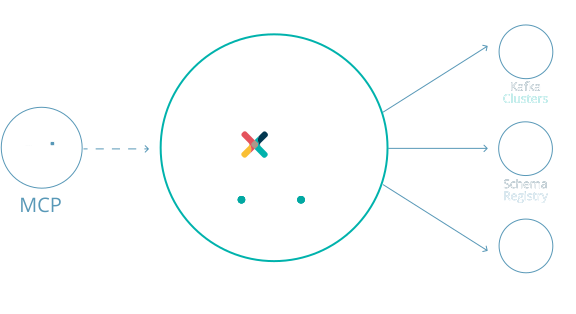
The Axual MCP Server connects AI assistants to the Axual platform, letting you manage Kafka using natural language instead of raw commands or UI clicks. It works through Axual's Self Service APIs, so every action such as creating topics, deploying apps, or browsing messages stays governed by existing ownership, environment, and access rules.
You describe what you want in plain language, for example "create a topic called orders in dev," and the AI selects the right MCP tool to carry out the request. The server executes it through Axual's Self Service APIs, which enforce ownership, environment, and access policies before returning the result in the same conversation.
No, the MCP server doesn't grant any new access; it only makes a user's existing Axual permissions accessible via AI. The AI operates with the exact same permissions as the user (no elevation), never touches Kafka directly, and all actions pass through Axual's governed Self Service APIs, fully compatible with enterprise Identity and Access Management systems.
Yes. Through the Axual MCP server, your AI assistant can create and manage Flink SQL applications. Describe the job in plain language, and the agent writes the SQL and deploys it as a managed job on a Flink cluster your tenant has registered. Flink SQL support is currently in preview.
No. Axual can generate the table definitions from your connected Kafka topics, so you or your agent only need to write the transformation logic. You can still write the tables by hand if you prefer.
You can discover and search topics, environments, and deployments; create topics with correct ownership; produce and browse test or real messages; create and manage streaming applications; generate and deploy KSML apps; and request or enforce Kafka access permissions, all through natural language prompts.
KSML (Kafka Streams Markup Language) lets you define Kafka Streams pipelines in YAML to filter, transform, and route data without writing code. Through the MCP Server, you can ask an AI assistant to generate a KSML application, register it, and deploy it directly on Axual, for example filtering pending transactions from a topic into another one.
Both run as managed applications on Axual. KSML suits teams that want to define Kafka Streams pipelines in YAML with Python logic, without running extra infrastructure. Flink SQL suits teams that already know SQL or run Flink, and want to process streams on their own Flink cluster. Your agent can work with either.
First, get your MCP server URL from Axual Self Service. Then connect your AI client. For example, with Claude Code you'd run claude mcp add --transport http axual [your-mcp-server-url]. Once connected, you can start asking questions like "What environments are available in Axual?"