Kafka Connect reimagined: One Connect server per team
In this blog, we explore how Axual’s new Kafka Connect integration gives teams better workload isolation, group based governance and more control over connector deployments. Learn what’s changed in release 2026.3 and what it means for existing connectors.
Since 2020, Axual customers have run their connectors on Axual Connect, our fork of Kafka Connect. It worked, but it had limits. Each tenant could run only one Connect cluster, so a single noisy connector could slow down everyone else’s. With release 2026.3, that changes. Teams can now run their own native Kafka Connect clusters, with group-based ownership, SASL authentication and live logs. In this post, we explain what’s new, how the architecture works, who benefits and what it means for your existing connectors.
What’s new in Axual’s Kafka Connect integration?
Release 2026.3 adds support for multiple Kafka Connect clusters per instance, group-based ownership, SASL authentication, live streaming logs, multiple connector plugin versions, on-demand plugin discovery and native Apicurio serdes support.
Kafka Connect reimagined: One Connect server per team
Kafka Connect support has been part of the Axual platform since a long time (2020). It is a key component of any data ingress and egress framework allowing for integration with a plethora of external systems.
In this post we will discuss the differences of what was in place so far and how Axual envisions the integration to look like going forward. For the technical details see the axual docs: Kafka Connect: Concepts and Architecture, What's New in 2026.3 and the 2026.3 release notes.
What is a Kafka Connector?
A connector allows for data streaming between Apache Kafka and other systems. It does this by configuration rather than an implementation task by introducing pluggable pieces of code that take care of the boilerplate code. For more information on the key concepts you can see the docs.
Axual Connect
Back in 2020 we introduced Kafka Connect to the platform through Axual Connect. This is a fork of Kafka Connect enriched with some Axual specific functionality to enable multi-tenancy via topic name prefixes and a Java log appender based-connector logging implementation. One intricacy of that initial design is that each Tenant is allowed to only define a single Axual Connect cluster. That results in limited isolation of Connect clusters. By extension in such a setup a single noisy connector such as one with high throughput, many tasks, excessive logging, could potentially affect every other running connector on the cluster. This is an operator headache that is difficult to address.
Additionally we were tasked with maintaining our fork of that open source project which meant that developer hours were going into testing our solution against any upstream changes whenever a Kafka Connect release was made. This time would much rather be invested in developing new features and improving the product, also meant that new features that were readily available on KC were not made available to you until we had gone through this validation.
Lastly since Kafka Connect itself allows for only one means of authentication against Kafka and at the time Axual Connect was introduced we only supported and advocated for TLS, that was the obvious choice for how connectors running on the cluster would authenticate as well.
Enter Kafka Connect Reimagined
With the release 2026.3 we are happy to announce the second iteration of the Kafka Connect integration which comes with significant improvements. For starters we allow for each Instance to register any number of Kafka Connect (KC) Clusters and Axual Connect is phased out (more on the phase out plan follows).
The Tenant Admin can register any number of pure Kafka Connect clusters per Instance instead of a single Axual Connect. For that we have introduced a new helm chart to help you get started.
If you want to deploy your own Connect cluster, the only thing we require is for the presence of our Axual Topic resolver SMT and the Vault secret provider to be present on the classpath. This enables topic name resolving based on the cluster topic pattern and is not needed for on prem installations where the topic pattern is {topic}. The Vault secret provider is there for retrieval of secrets that are referred to by Connector configs.
Key features of the new release:
- Better isolation of workloads by allowing for multiple Kafka Connect clusters per instance
- Fine grained KC cluster governance through group based ownership
- Addition of SASL Kafka client authentication support for Connectors
- Support for live logs streaming
- Multi version connector plugin installation support
- On-demand (and scheduled) Connector plugin discovery
- Native support for Apicurio serdes **
Tenant Admin can separate workloads by creating a KC cluster for every distinct use case, this cluster can be monitored and scaled independently, allowing for more flexibility.
Each of those clusters supports fine grained authorisation by defining an owning Group and multiple authorized groups. Every authorized group is able to deploy connector applications onto the cluster. The owning group is allowed to make modifications to the cluster.
Each KC cluster can use only one method to authenticate against Kafka. In this release SASL is also supported thus enabling faster deployment time with no need for certificate complexity.
Logs are now streaming live from the time the log window opens. Can be filtered on severity and searched on.
Each KC cluster may hold different Connector plugin versions, the Application owner can now choose the version they want to deploy.
KC clusters are polled for available plugins on a cron job, now this can also be manually triggered through the KC Plugin overview page, which lists all available plugins and their respective versions.
Based on the selection of the key/value converter class, the Platform Manager will pass the appropriate configuration for integrating with the Schema Registry. Those configurations are overridable by the user provided configurations, the application owner is in control. Support for Apicurio converters has been added.
Architecture
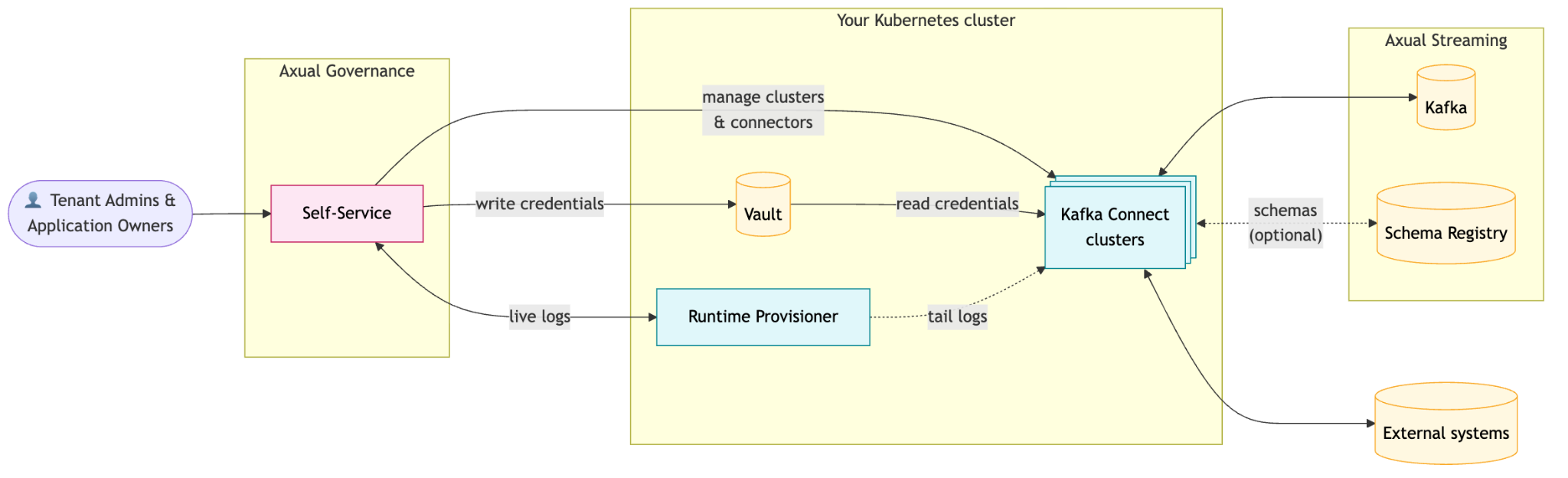
The key components involved include:
- Self Service which interfaces with
- KC REST (with or without basic authentication)
- Vault in order to persist application credentials
- (Optional) Runtime Provisioner to poll for live application logs
- Kafka Connect clusters with Axual SMT running on Kubernetes which interfaces with
- Kafka for I/O
- External systems for I/O
- Vault for secret retrieval
- (Optional) Runtime Provisioner for live application logs
- (Optional) Runtime Provisioner with the right Service Account attached, which is used to stream logs from the running Kafka Connect cluster to relay them to Self-Service
Who benefits from Kafka Connect Reimagined?
App owners, tenant admins and Axual itself each benefit in a different way.
For app owners. Better Isolation: Before, your connector could be slow because of other teams' connectors. Now your connector runs on a cluster tasked with a particular workload. Streaming logs are introduced in Self-Service accessible on the application page. Multiple plugin version support added the ability to select from and deploy any version of a plugin available on the KC runtime. SASL support added, determined by the KC cluster authentication type. Live streaming logs
For tenant admins, it's about control. Before, there was no way to decide who deploys connectors or where. Now the Tenant Admin is able to register each cluster and choose owning and authorized groups.
For Axual, it means native Kafka Connect. Less custom code and less maintenance means that the control of KC version is entirely an operator task now enabling faster adoption of new KC versions.
What about existing Connectors?
Axual Connect still runs alongside Kafka Connect during a deprecation window, but migration will eventually be required.
Plan the move with care: connector offsets aren't migrated automatically between Axual Connect and Kafka Connect, and the migration path is still being defined. Migrate from Axual Connect to Kafka Connect explains what happens to sink and source connector state.
What’s next
2026.3 was the first release introducing the new KC integration. The team is excited to further improve the Kafka Connect integration by working on the following in the upcoming releases):
- Redesign of the logging window for improved UX
- Live KC cluster Insights
- Live CPU and Memory statistics of all workers
- Active connector status per KC cluster
- Secret application configuration persistence on Vault
- Definition of a migration path for existing connectors
- Automatic credential generation when needed
Have a question about Kafka Connect or a suggestion for what we should build next? Contact us to share your feedback and connect with the Axual team.