Release Blog 2025.4 - The Winter Release
Axual 2025.4, the Winter Release, expands on the governance and self-service foundations of 2025.3 with improved KSML monitoring and state management, an enhanced Schema Catalog, and usability improvements across Self-Service and the platform.
On this page
Release Blog 2025.4 - The Winter Release
Axual 2025.4 builds on the governance and self-service foundations of 2025.3. The Winter Release introduces a broad set of improvements, with extended capabilities across Self-Service and platform usability. This release includes improved KSML support in Self-Service with enhanced monitoring and state management, an improved Schema Catalog with a condensed view, enhanced searching, and better schema handling, and usability improvements such as sorting Topic Browse messages by timestamp. Additional Self-Service improvements provide clearer visibility into administrative roles for Tenant Admins, while other updates include enhancements to CSV exports and new documentation, including an upgrade guide from Kafka 3.x to 4.x.
What’s Included in the 2025.4 Release
- Improved KSML Support in Self-Service
- Other Self-Service Improvements
- Improved Schema Catalog
- Sorting Topic Browse Messages by Timestamp
- Tenant Admins Can View Who Is Admin
- Further Updates
1. Improved KSML Support in Self-Service
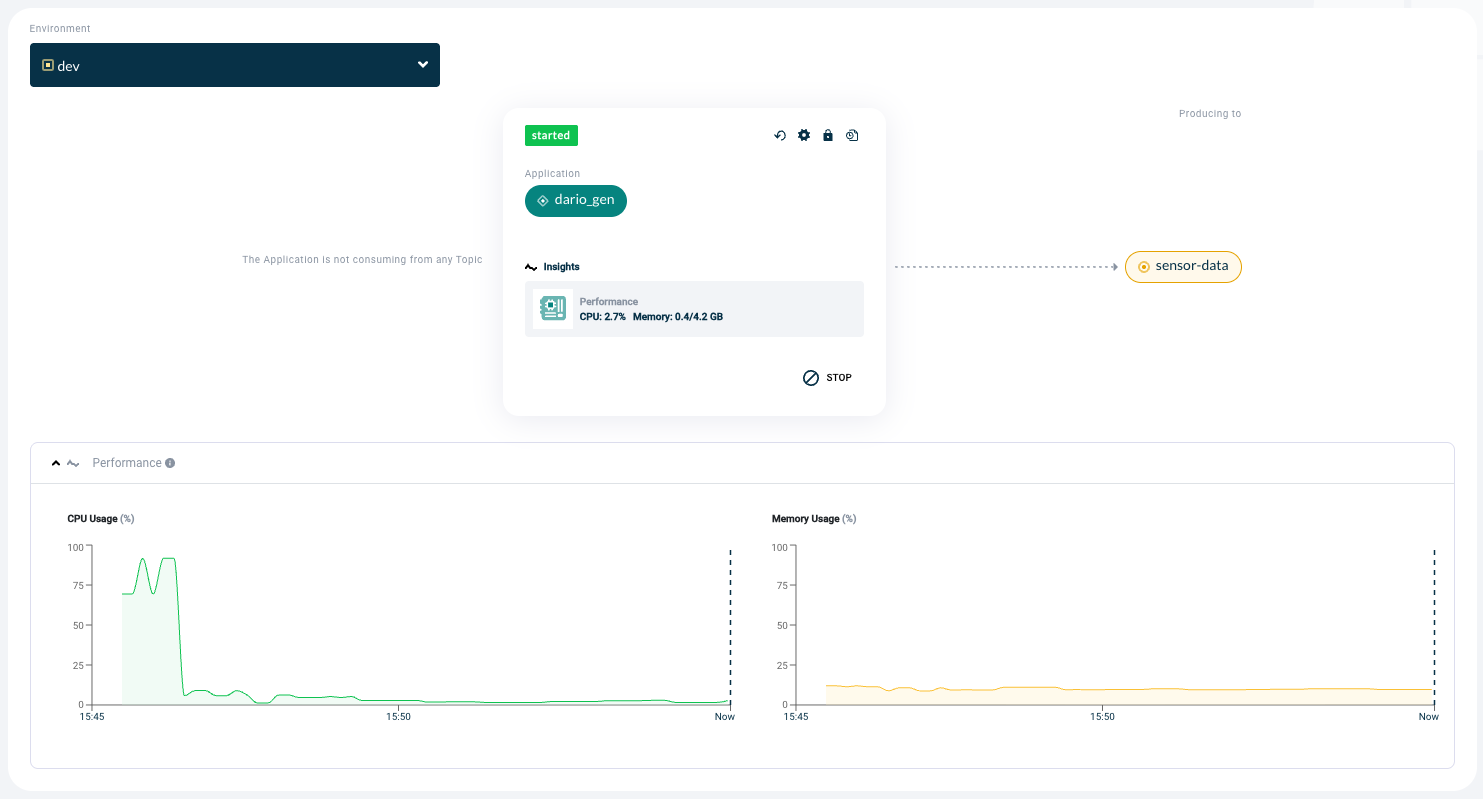
We have improved the monitoring and control of your KSML applications in Self-Service. New graphs were introduced so you can monitor CPU and memory usage to understand if you need to scale up or scale down your deployment size. You also now have the ability to control the State Store persistence of your applications.
The improvement consists of two enhancements to how KSML applications are monitored and managed in Self-Service:
- Enhanced runtime visibility
For a running KSML application, it is now possible to view CPU and memory usage in real time through newly introduced graphs. This is particularly useful for cost-aware customers that do not want to oversize their application deployments and want to utilize cloud resources effectively.
- Improved state management control
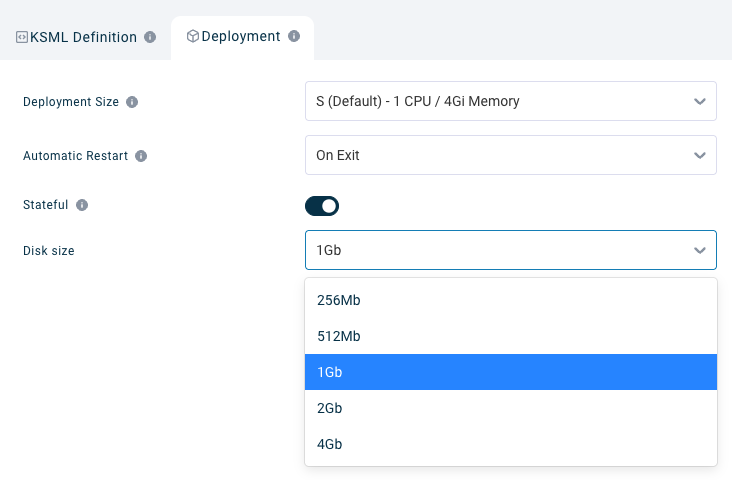
When configuring a KSML application in Self-Service, users can now enable a Stateful option, which makes State Stores persistent. When this option is enabled, State Stores are written to a Persistent Volume that is available across application runs.
Lifecycle management has been extended so that Persistent Volumes follow the lifecycle of the KSML application: Self-Service deletes the Persistent Volume when the application is deleted. In addition, App Owners can manually trigger cleanup via the App Reset button. Where previously only internal topics were cleaned up, the reset action now also wipes the Persistent Volume, allowing the application to start fresh.
How teams benefit from improvement?
With improved KSML support in Self-Service, teams benefit in the following ways:
- Better resource optimization and cost control: By having real-time visibility into CPU and memory usage, teams can make informed decisions about scaling their KSML applications up or down. This is particularly valuable for cost-aware teams that want to avoid over-provisioning and use cloud resources efficiently.
- Greater control over application state: Persisting State Stores across app runs allows teams to retain state when restarting or redeploying applications, improving reliability and reducing recovery time. At the same time, the ability to reset both internal topics and persistent state ensures that teams can still start fresh when needed.
- Simplified lifecycle management: Automatic cleanup of Persistent Volumes when an app is deleted prevents dangling resources and reduces operational overhead. This makes stateful KSML applications easier and safer to operate in both cloud and on-premise environments.
Overall, these improvements give App Owners more insight, more control, and a smoother operational experience when running KSML applications through Self-Service.
2. Other Self-Service Improvements
In this section we will cover three improvements:
- Improved schema catalog
- Sorting Topic Browse messages by timestamp
- Tenant Admins view
Improved Schema Catalog
The new Schema Catalog provides users a condensed view with enhanced searching features. Interactions with schema become easier, as all possible actions for a schema are easy to find. In addition, schema handling in the background is improved by improved normalisation rules, and users can now be notified of new schema applied to topics they produce to or consume from.
The improvement consists of the following:
- The Schema Catalog provides users a condensed view with enhanced searching features.
- Interactions with schema become easier, as all possible actions for a schema are easy to find.
- Based on user feedback, the Schema Catalog is no longer organized as a namespace-based tree. The updated Schema Catalog now presents all schemas in a flat list, without hierarchy.
- Each schema shows the Schema Name, the Schema Type (AVRO, JSON or PROTOBUF), the last schema version uploaded, the Group Owner and the available actions.
- The catalog also allows users to search schemas easily.
- Schema handling in the background is improved by improved normalisation rules.
- Users can now be notified of new schema applied to topics they produce to or consume from.

How teams benefit from this improvement:
With the improved Schema Catalog, teams benefit in the following ways:
- The new Schema Catalog is particularly useful for users that interact with schema often.
- For example, when they want to find an existing schema to re-use, instead of uploading a new one.
- It is very useful for admins to verify that all schemas have the correct owner.
- The improved normalisation better prevents uploads of schema duplicates.
- The new notification feature is particularly useful for app owners that want to hear about schema version changes on topics they consume from or produce to.
Sorting Topic Browse Messages by Timestamp
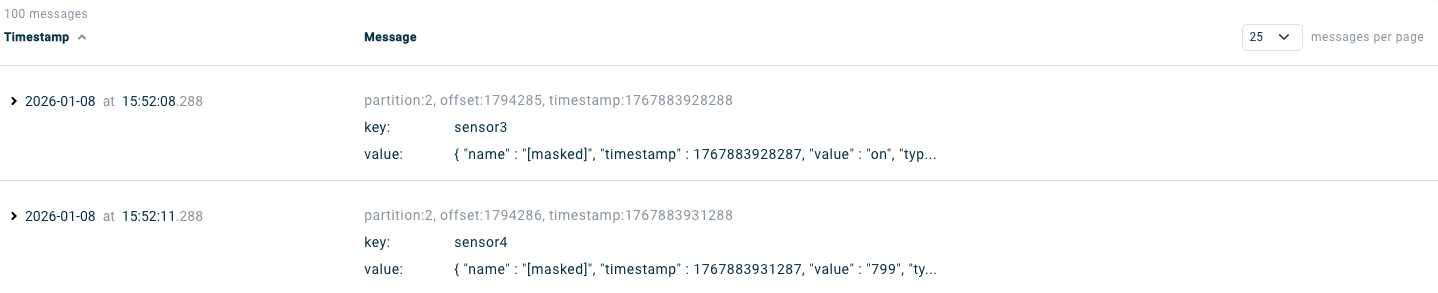
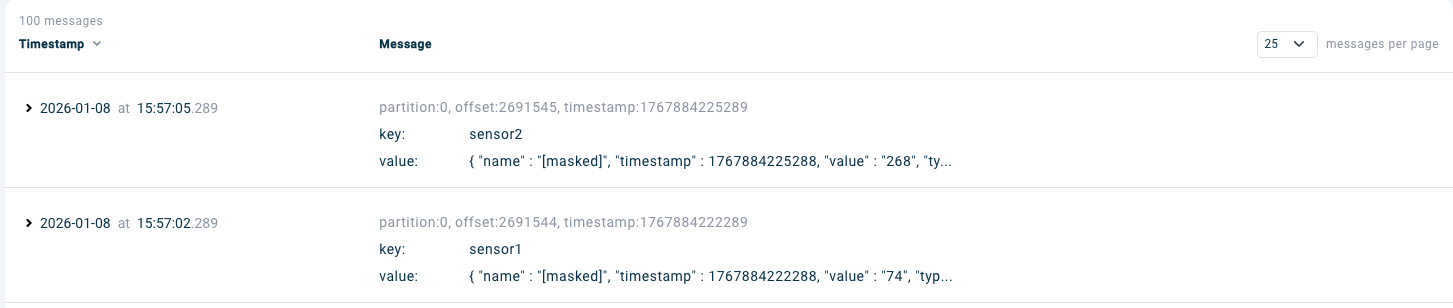
When searching for messages produced to a Kafka Topic, most of the time users want to see either the last messages produced or the oldest messages on the Kafka Topic. It is now possible to do this by clicking on the Timestamp column.
The improvement consists of the following:
- Messages can be sorted by timestamp.
- Users can sort messages with oldest messages first or with newest messages first.
Oldest first 🔽
Newest first 🔽
How teams benefit from this improvement:
With sorting by timestamp in Topic Browse, teams benefit in the following ways:
- Application Owners can easily find the last produced messages.
- This is useful during development and testing of applications.
Tenant Admins View
The Admins tab in the Tenant menu provides easy access to users that have at least an Admin role so that Tenant Admins can verify how many admins there are in their organization, who they are, and what specific admin permissions they have.
The improvement consists of the following:
- The Admins tab provides a list of users that have at least an Admin role.
- The list includes Tenant Admin, Application Admin, Topic Admin, Environment Admin, and Schema Admin.
- The Admins tab allows searching by any of the Admin roles.
How teams benefit from this improvement:
Useful to admins with a Compliance responsibility, who always need to be aware of people in the organisation with elevated roles and rights.
What Else Is New? Further Updates in 2025.4
Not mentioned above, but noteworthy updates are:
- CSV export of topics now includes an ‘orphan’ column to indicate that there are no producers and consumers authorized to produce to or consume from the topic.
- Specific documentation was added for customers.
- An upgrade guide from Kafka 3.x to 4.x was added.
Managing Kafka at Scale with Governance and Control
Axual 2025.4 helps teams manage Kafka environments more effectively by providing greater insight, stronger control, and improved usability across Self-Service and the platform. Enhanced KSML monitoring and state management support more efficient and reliable application operations, while the improved Schema Catalog and usability enhancements simplify daily workflows.
Strengthen governance across your streaming infrastructure. Contact us to learn how Axual addresses enterprise Kafka compliance and operational challenges.
Request a demo and talk to our experts

Answers to your questions about Axual’s All-in-one Kafka Platform
Are you curious about our All-in-one Kafka platform? Dive into our FAQs
for all the details you need, and find the answers to your burning questions.


Related blogs
Axual’s Autumn Release 2026.3 is here. You can now run multiple Kafka Connect clusters per instance for better isolation and no more noisy neighbors, and create Flink SQL applications to run stream processing jobs directly on the platform. This release also brings self-service service accounts, Strimzi v1 support in the Distributor, Terraform and MCP updates, and more.

Vulnerability reports are growing faster than security teams can process them. This article explores how AI can support vulnerability triage, why fixes take time to reach production and what the Trivy compromise taught us about software supply chain security.
.png)

Learn how to configure secure Kafka authentication in Strimzi for multi-tenant environments. This technical guide covers mTLS, certificate-chain principals, tenant-specific listeners, custom principal builders, OAuth bearer authentication, and the risks of relying on Strimzi internals.